Google Play Store
Searching for apps in the Play Store
1. Play Store app
You can find the Play Store app in the ‘all apps’ menu item on your home screen.
Tap on it and scroll down to the ‘Play Store’ entry.
2. The search bar
Tap on the ‘Play Store’ entry.
Immediately after launching the app, the search bar appears at the top of the home page.
3. Enter search term
At this point, we assume that you know which app you are looking for. Activate the search field, the on-screen keyboard will open and you can enter any search term. As you type, the app will show you specific suggestions based on your input.
Download apps
Once you have found the app of your dreams, you can install it. If your chosen app is compatible with your device, you can get started right away.
Install
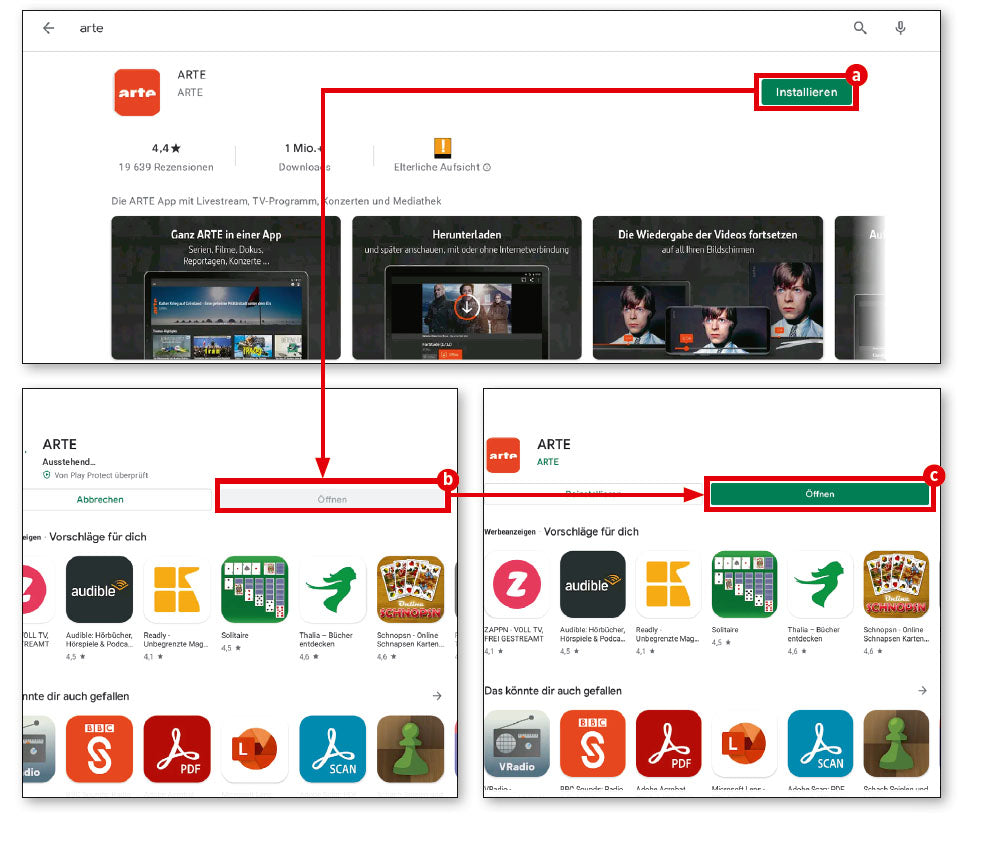
If the desired app is free and can be installed on your device, a green button labelled ‘Install’ (a) will appear. If it is a paid app, the price will appear instead.
Installation process
During installation, the ‘Open’ button (b) is inactive. Once installation is complete, it will turn green and can be tapped to open the app for the first time (c). You will then find this app like any other app in your tablet's app menu, which you can access via ‘all apps’.