Google Services
What is Google? Google is such a common term today that it even describes an activity: ‘googling’ refers to the process of searching the internet for information on a topic or term.
Google was founded in the late 1990s and started out as an internet search engine. Google services are pre-installed on all Android devices and are mostly free of charge. A Google account is required.
What is a Google account?
You are probably familiar with the term ‘account’ in connection with your bank account. A Google account is something different: just as your bank manages your money on your behalf, Google manages your data in the digital world. The term ‘account’ here is not primarily to be understood in a financial sense, but rather as a user account, similar to an email account.
What does a Google account consist of, and what do I need to remember?
Like any other user account, a Google account consists of a username and password. Both are set when you create your Google account:
- Make a note of your Gmail address and password and keep them in a safe place.
- Think of your Google account as a locker where your data and usage habits are stored. If you want to open a locker to access its contents, you need the key.
- It's exactly the same with your Google account: without the password, you can no longer access the data stored there. A locker without a key is lost to you!
Tip: Every Gmail address is unique! So if you already have a Gmail address, you already have a Google account.
What Google services are available?
Google provides numerous apps on the internet; the Google search engine, for example, can be used without registering. Other apps can only be used if you are logged in to Google. The Google account allows you to access all Google services that require registration:
Google Play Store
App for downloading other apps for smartphones and tablet.
Gmail
Google's free email account.
YouTube
Online portal for viewing and uploading videos.
Google Photos
Application for photo management and backup.
Google Drive
Cloud service for storing, sharing and managing data.
Google Maps
Map service and navigation.
Google Calendar
Google Translate
Google Assistant
Google News
How does Google Search work?
Today, Google's portfolio includes countless services, but since 1998, the focus has been on the search engine, which allows you to find almost anything you are looking for on the web.
The simple input field has hardly changed since its inception. The mechanics that work in the background, however, have changed significantly.
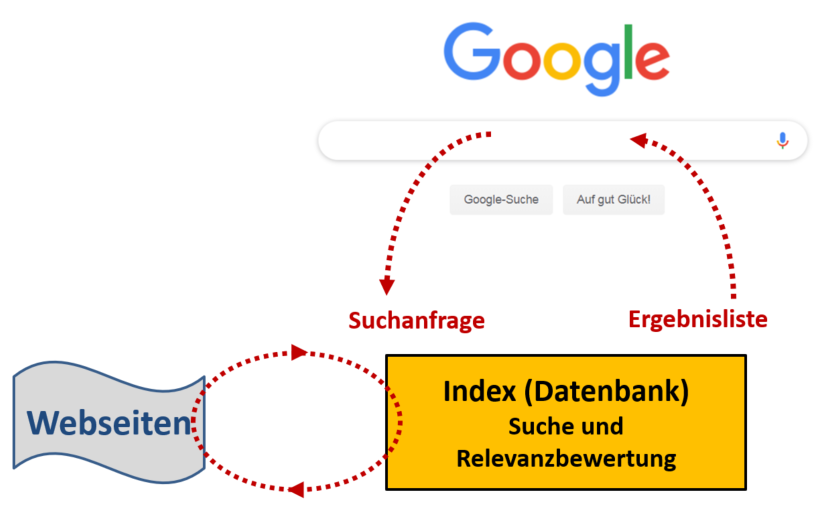
In order for Google to show you the information you are looking for, websites are indexed using so-called web crawlers. These always follow new web links and thus find new sites through cross-references. The index is correspondingly gigantic.
Google does not search the web again with every query, but rather searches the index that has already been created. This is then filtered according to your search terms.
How do you create a Google account?
What you need:
- Internet connection (with Wi-Fi or mobile data)
How to proceed:
- Step 1: Open settings – accounts – Add account – Google – Create account (For myself)
- Step 2: Personal details
- Step 3: Choose a Gmail address (you can choose any name you like, e.g. vor@gmail.com)
- Step 4: Create your own password
- Step 5: Privacy and terms, settings and permissions for your Google account
What does the message ‘Complete account setup’ mean?
This message refers to your Google account. No payment method was specified when you set up your Google account. This is not necessary as long as you do not want to make online purchases with your smartphone.
If you use one of the Google services, e.g. Google Play Store, this prompt may appear: Complete the account setup before continuing with the installation of the app on Google Play. Tap on ‘Continue’.
A list of different payment methods will be displayed. Don't let this confuse you! At the bottom left, there is a somewhat inconspicuous option to ‘Skip’. Tap on it and the process will be completed.
Tip: Unfortunately, this prompt cannot be permanently disabled without specifying a payment method. You will have to skip the process every time the prompt appears. Alternatively, you can create an account with a secure payment service such as PayPal so that you can shop and pay online without any risk.