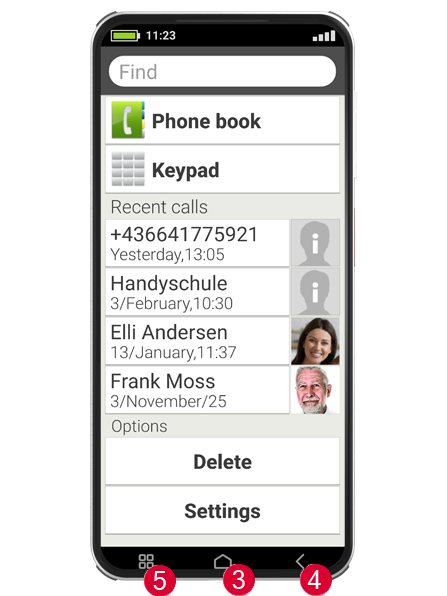
Basics: How do you operate a smartphone with buttons?
Although a smartphone is operated using a touch-sensitive screen, the touchscreen, it does have a few physical buttons as well!
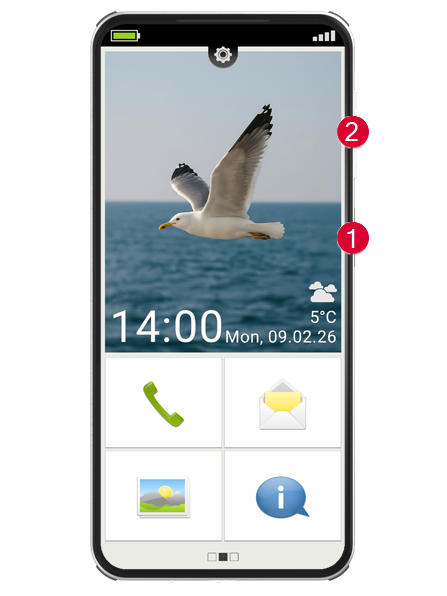
On/Off buttons (1)
Every device of course needs an on/off button and, in this case, it is the short button on the side of the phone. This button has two functions:
- Press and hold: If you press and hold the button down for longer than 2 seconds, the device will turn on or off completely.
- Brief press: If you press the button briefly when the phone is on, the touchscreen will be deactivated and therefore go black. This doesn't mean the phone has been switched off, however; it is just in sleep mode. To wake the device, press the on/off button again briefly. The touchscreen is now sensitive to input again and will respond when you touch it.
Volume button (2)
The long button on the side of the phone enables you to control the volume. Press the top half to make it sound louder and the bottom half to make it quieter.
Tip: If the phone is ringing and you want to turn off the ringtone quickly, simply press the volume button. The ringing will stop, but the call will not be interrupted. You can now take all the time you need to decide whether to accept or reject the call. You can also mute the alarm in the same way.